Icon of program: MWSnap

MWSnap for Windows

  • Free
  • 4.2
    447
  • 191.4K
  • V3.00.0.74

Practical tool to take screen snapshots

Screen captures are useful for various reasons. You can use them to highlight a certain aspect of a program to friends, make presentations or explain a technical problem you’re having. At Softonic, we usually use SnagIt to take screenshots but MWSnap does the job equally as well and best of all, it’s completely free.

Top Recommended Alternative
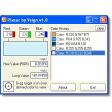
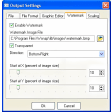
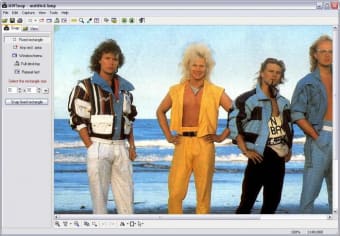
MWSnap is a small but powerful screen capture program capable of taking whole desktop shots, a highlighted window, an active menu or a fixed or free rectangular part of the screen. It can save images in all of the major image formats (JPG, BMP, TIFF, PNG and GIF) and also includes a zoom, a ruler and a colour picker. However, one of the most useful features specific to MWSnap is the autosave feature. This is brilliant for when you are filling in forms online and need to keep the details safe – just one click and it’s all saved automatically. MWSnap seems to be able to capture just about anything too – any size, shape or form. If something on the screen is too small you can always magnify it and capture it that way.

On the downside, the selection of hotkeys is limited. For example, you can’t just simply assign the PrtScn key to save screenshots. You have to use a combination of Shift, Ctrl, Alt and the function keys to take screenshots without the mouse. It could also do with a few more editing features such as the snazzy faded and jagged edge effects available in SnagIt. Some users also find that memory usage shoots up when taking captures which can make your system unstable although we didn’t experience this.

All in all, this an excellent free screen capture tool although if you’re looking for advanced editing features, you’d be better with SnagIt or FastStone Capture.


  • Pros

    • Autosave feature makes captures quick and easy
    • No registration or licence required
  • Cons

    • Few advanced editing features
    • Hotkeys limited
 0/1

App specs

  • License

    Free

  • Version

    3.00.0.74
  • Latest update

  • Platform

    Windows

  • OS

    Windows 98 SE

  • Language

    English

    Available languages

    • Czech
    • German
    • English
    • Spanish
    • French
    • Italian
    • Polish
    • Chinese
  • Downloads

    191.4K

    Last month's downloads

    • 252
  • Size

    658.77 KB

  • Developer

Program available in other languages


Icon of program: MWSnap

MWSnap for PC

  • Free
  • 4.2
    447
  • 191.4K
  • V3.00.0.74

User reviews about MWSnap

4.2

6 reviews

Add review

Main reviews for you

  • Anonymous user

    Great little application that I have been using for years. It gets around so many issues I have had presenting things.

  • Anonymous user

    Have taken 10,000 snaps using MW Snap over 10 years. Best there is. Because of it's functionality. Have tried 10 others.

  • Anonymous user

    Ease of use is incredible. Used it for years, from original MWSnap thru MWSnap2 and now MWSnap3. ease of use incredible. Pros: Ease of useAbility to save in different formats

  • Anonymous user

    Great snipping tool - outperforms others I have used.. I have used this tool for nearly 10 years. It's the best tool on the market. I have donated just because I believe in the product and the developer's sense of usefulnes.

  • Anonymous user

    Great for using multiple screen captures. The View tab makes this a very useful screen capture program. View lets you select from hundreds of previously captured images. Problem is when trying to print directly from the program. The size of the image is hard to control. Otherwise just paste the image into the program of your choice and print it from there. Pros: being able to get past screen capturesvery easy to select the size of the screen capture Cons: The printing function prints unexpected sized images.It needs a Print Preview option.

  • Anonymous user

    Love this ...but. I`ve used MWsnap for over a year on my lappy and think it`s really awsome.I`ve just built my own desktop and for some reason MWsnap won`t work with hot keys. I can`t find any faqs or link to forum to ask in. Pros: Hot key area snap for taking images of portions of web pages. Cons: None except this little problem using it on my new PC using Win7 home premium 64

More

You may also like

Alternatives to MWSnap

Explore Apps

Latest articles

Laws concerning the use of this software vary from country to country. We do not encourage or condone the use of this program if it is in violation of these laws.
Softonic

Is MWSnap safe?

100/100

Score result: Clean

This file passed a comprehensive security scan using VirusTotal technology. It is safe to download.

  • Virus free
  • Spyware free
  • Malware free
  • Verified by Security Partners

    VirusTotal logo

Scan Info

Last scan
Monday, April 22, 2024
Scan provider
VirusTotal · Full report

File Integrity

File
MWSnap300.exe
SHA256
b858c7edbac9cac4a78f9eea79a5cc31940b39e39c2929252db56a5a5284f967
SHA1
c3853dc80f053d0c7652f66144675c1cdd723754

Softonic security commitment

MWSnap has been thoroughly scanned by our advanced security systems and verified by industry-leading partners. This file comes from the official developer and has passed all our security checks, showing no signs of viruses, malware, or spyware. For more information, visit our Security and Trust Center